

SQL Commands with Examples
SQL (Structured Query Language) is the standard language used to manage and interact with relational databases. Whether you’re preparing for a data analytics job, learning database development, or working in software engineering, understanding SQL Commands with Examples is one of the most valuable technical skills you can acquire.
According to the Stack Overflow Developer Survey, SQL consistently ranks among the most-used programming and database languages worldwide. Today, companies use SQL in industries such as banking, healthcare, e-commerce, education, and marketing to manage millions of records efficiently.
In this guide, you’ll learn Basic SQL Commands, understand SQL Syntax with Examples, explore SQL Query Examples, and discover the best SQL Commands for Beginners.
What are SQL Commands ?
SQL commands are instructions used to communicate with a relational database. They allow users to retrieve, insert, update, delete, and manage data stored inside database tables.
The most common SQL commands include:
| Command | Purpose |
| SELECT | Retrieve data |
| INSERT | Add new records |
| UPDATE | Modify existing records |
| DELETE | Remove records |
| CREATE | Create tables or databases |
| ALTER | Modify table structure |
| DROP | Delete database objects |
| JOIN | Combine data from multiple tables |
These commands form the foundation of SQL and are essential for beginners and professionals alike.
SQL Commands with Examples
Learning SQL Commands with Examples makes it much easier to understand how databases work. Below are the most frequently used SQL commands.
1. SELECT Command
The SELECT command retrieves data from a table.
Example
SELECT * FROM Students;
Retrieve only specific columns:
SELECT Name, Age
FROM Students;
This is one of the most common SQL Query Examples you’ll use daily.
2. INSERT Command
The INSERT command adds new records.
INSERT INTO Students(Name, Age, City)
VALUES (‘Rahul’, 22, ‘Delhi’);
Result:
A new student record is added to the database.
3. UPDATE Command
Use UPDATE to modify existing records.
UPDATE Students
SET City = ‘Noida’
WHERE StudentID = 1;
Always use the WHERE clause to avoid updating every row.
4. DELETE Command
The DELETE command removes records.
DELETE FROM Students
WHERE StudentID = 3;
Without a WHERE clause, all records will be deleted.
5. CREATE TABLE Command
Create a new database table.
CREATE TABLE Students(
StudentID INT,
Name VARCHAR(50),
Age INT,
City VARCHAR(50)
);
This is among the first SQL Commands for Beginners.
6. ALTER TABLE Command
Modify an existing table.
ALTER TABLE Students
ADD Email VARCHAR(100);
This adds a new Email column.
7. DROP TABLE Command
Delete an entire table.
DROP TABLE Students;
Be careful—this permanently removes the table and its data.
8. WHERE Clause
Filter records based on conditions.
SELECT *
FROM Students
WHERE City = ‘Delhi’;
This improves query accuracy and performance.
9. ORDER BY Command
Sort results.
SELECT *
FROM Students
ORDER BY Age DESC;
You can sort in ascending (ASC) or descending (DESC) order.
10. JOIN Command
Combine data from multiple tables.
SELECT Students.Name,
Orders.OrderDate
FROM Students
INNER JOIN Orders
ON Students.StudentID = Orders.StudentID;
JOIN is heavily used in real-world business reports and dashboards.
Basic SQL Commands Every Beginner Should Learn
If you’re starting your SQL journey, master these commands first:
- SELECT
- INSERT
- UPDATE
- DELETE
- CREATE
- ALTER
- DROP
- WHERE
- ORDER BY
- GROUP BY
- HAVING
- JOIN
These Basic SQL Commands cover approximately 80% of everyday SQL work.
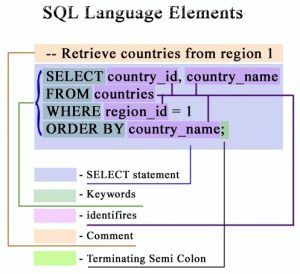
SQL Syntax with Examples
Every SQL query follows a simple structure.
Example:
SELECT column_name
FROM table_name
WHERE condition
ORDER BY column_name;
Example:
SELECT Name
FROM Students
WHERE Age > 20
ORDER BY Name;
Understanding SQL Syntax with Examples helps you write cleaner, error-free queries.
Practical SQL Query Examples
Here are some useful SQL Query Examples you can practice.
Find all students older than 20
SELECT *
FROM Students
WHERE Age > 20;
Count students
SELECT COUNT(*)
FROM Students;
Find average age
SELECT AVG(Age)
FROM Students;
Display unique cities
SELECT DISTINCT City
FROM Students;
Find highest salary
SELECT MAX(Salary)
FROM Employees;
Tips for Learning SQL Faster
To become confident with SQL Commands for Beginners, follow these best practices:
- Practice SQL every day.
- Work on real datasets.
- Understand database relationships.
- Learn JOINs before advanced topics.
- Solve SQL interview questions regularly.
- Focus on writing queries instead of memorizing syntax.
- Use online SQL playgrounds to test your queries instantly.
Read Also : Beginner Guide to SQL for Data Analytics
Why SQL Is Still Important in 2026
SQL remains one of the most in-demand technical skills because it powers:
- Data Analytics
- Business Intelligence
- Artificial Intelligence data pipelines
- Data Engineering
- Software Development
- Banking systems
- Healthcare databases
- E-commerce platforms
- Digital Marketing reporting
Professionals with SQL knowledge are highly valued across industries, making it a foundational skill for many technology careers.

Frequently Asked Questions (FAQs)
1. What are SQL commands?
SQL commands are instructions used to create, read, update, delete, and manage data stored in relational databases.
2. Which SQL command is used to retrieve data?
The SELECT command retrieves data from one or more database tables.
3. Is SQL easy for beginners?
Yes. SQL has simple syntax, making it one of the easiest programming-related languages to learn. Starting with Basic SQL Commands helps beginners build confidence quickly.
4. What is the difference between DELETE and DROP?
- DELETE removes records while keeping the table.
- DROP permanently removes the entire table, including its structure and data.
5. How long does it take to learn SQL?
Most beginners can learn fundamental SQL concepts and commands within 2–4 weeks of consistent practice. Mastery depends on regular hands-on experience.
Final Thoughts
Learning SQL Commands with Examples is one of the fastest ways to build a strong foundation in database management and data analysis. By mastering Basic SQL Commands, practicing SQL Query Examples, and understanding SQL Syntax with Examples, you’ll be well-prepared for real-world projects, technical interviews, and modern data-driven careers. Start with the fundamentals, practice consistently, and gradually explore advanced SQL features to become a confident SQL professional.
