

How to Learn Excel Fast : Complete Beginner Guide
Microsoft Excel remains one of the most valuable workplace skills in 2026. Whether you’re a student, job seeker, business owner, or professional, learning Excel can improve productivity, data analysis, reporting, and decision-making.
If you’re wondering how to learn Excel fast, the good news is that you don’t need months of training. With the right roadmap and consistent practice, you can learn the most important Excel skills within a few weeks.
In this guide, you’ll discover the fastest learning strategy, essential functions, free resources, and practical exercises to master Excel efficiently.
Quick Answer: How to Learn Excel Fast?
The fastest way to learn Excel is:
- Learn the Excel interface and basics.
- Practice daily for 30–60 minutes.
- Focus on formulas and functions first.
- Work on real-world spreadsheets.
- Complete a Free Excel Crash Course.
- Use sample datasets for practice.
- Learn shortcuts to improve speed.
- Build mini-projects regularly.
Most beginners can become comfortable with Excel basics in 2–4 weeks of consistent practice.
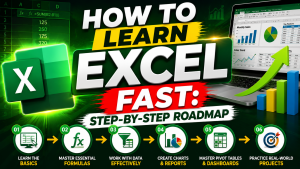
How to Learn Excel Fast: Step-by-Step Roadmap
If your goal is to understand how to learn Excel fast, follow this structured approach instead of randomly watching videos.
Step 1: Understand the Excel Interface
Before using formulas, familiarize yourself with:
- Rows and columns
- Cells and ranges
- Worksheets
- Workbooks
- Ribbon menu
- Formula bar
Knowing where everything is located will help you work more efficiently.
Step 2: Learn How to Use Excel for Basic Tasks
Many beginners search for how to use Excel but get overwhelmed by advanced topics.
Start with simple tasks:
| Task | Example |
| Data Entry | Employee records |
| Formatting | Colors, fonts, borders |
| Sorting | A-Z and Z-A |
| Filtering | Show specific data |
| Basic Math | Addition and subtraction |
Master these fundamentals before moving to advanced functions.
Step 3: Learn Essential Excel Formulas
Excel formulas save time and automate calculations.
Focus on these functions first:
- SUM()
- AVERAGE()
- COUNT()
- MAX()
- MIN()
- IF()
- CONCAT()
- TODAY()
Example:
=SUM(A1:A10)
This formula automatically adds values from cells A1 through A10.
According to workplace productivity studies, professionals who regularly use formulas can complete spreadsheet tasks significantly faster than manual calculations.
Step 4: Take a Free Excel Crash Course
A structured Free Excel Crash Course can dramatically reduce your learning time.
A good crash course should cover:
- Excel basics
- Formulas
- Charts
- Conditional formatting
- Data validation
- Pivot tables
- Basic dashboards
Instead of jumping between random tutorials, follow one complete learning path.
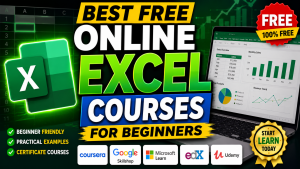
Best Free Online Excel Courses for Beginners
Many learners prefer Free Online Excel Courses because they provide flexibility and practical lessons.
Look for courses that include:
Beginner Level
- Excel interface
- Formatting
- Basic formulas
Intermediate Level
- Lookup functions
- Pivot tables
- Charts
Advanced Level
- Power Query
- Dashboards
- Automation
Choose project-based courses rather than theory-heavy lessons.

Practice Strategy That Accelerates Learning
Learning Excel is similar to learning a language.
Reading alone won’t help.
Practice daily using:
Personal Budget Sheets
Track:
- Income
- Expenses
- Savings
Sales Reports
Create:
- Monthly reports
- Revenue calculations
- Trend analysis
Student Mark Sheets
Calculate:
- Total marks
- Percentage
- Rankings
Real projects help you understand concepts faster than tutorials.
Essential Excel Shortcuts Every Beginner Should Learn
Keyboard shortcuts can save hours of work.
| Shortcut | Function |
| Ctrl + C | Copy |
| Ctrl + V | Paste |
| Ctrl + Z | Undo |
| Ctrl + S | Save |
| Ctrl + Arrow Keys | Navigate data |
| Alt + = | Auto Sum |
| Ctrl + Shift + L | Filter Data |
Learning just 10–15 shortcuts can significantly increase productivity.
Take your Excel skills to the next level with the Innozant Advanced Excel Video Course. This self-paced course includes 50+ hours of recorded lectures, practical assignments, downloadable resources, monthly doubt sessions, and a certificate upon completion. Learn Advanced Excel, VLOOKUP, XLOOKUP, Pivot Tables, Dashboards, Power Query, Data Analysis, and industry-ready reporting skills from beginner to advanced level.
Common Mistakes That Slow Down Excel Learning
Many beginners struggle because they:
Skip the Basics
Advanced formulas make little sense if you don’t understand worksheets and cell references.
Memorize Without Practice
Watching videos is not enough.
Apply every lesson immediately.
Learn Too Many Topics at Once
Focus on:
- Basics
- Formulas
- Charts
- Pivot Tables
- Dashboards
Ignore Real Projects
Real datasets provide the fastest learning experience.
30-Day Excel Learning Plan
Week 1
- Excel interface
- Formatting
- Data entry
- Basic calculations
Week 2
- SUM
- IF
- COUNT
- AVERAGE
- Sorting and filtering
Week 3
- Charts
- Pivot tables
- Conditional formatting
Week 4
- Dashboard creation
- Real-world projects
- Practice exercises
Following this roadmap is one of the most effective ways to understand how to learn Excel quickly and build job-ready skills.
Why Excel Skills Are Important in 2026
Excel remains essential across industries:
- Data Analytics
- Finance
- Marketing
- Human Resources
- Operations
- Sales
- Project Management
Many employers still list Excel proficiency as a required skill.
Even with AI tools becoming more common, Excel continues to be the foundation for data organization and analysis.
Learn Excel for free on the Innozant YouTube Channel. From basic Excel concepts to advanced formulas, Pivot Tables, dashboards, and data analysis, the channel provides practical tutorials to help students and professionals master Excel and improve their career opportunities.
Final Thoughts
If you’re searching for how to learn Excel fast, focus on structured learning, daily practice, and real-world projects. Start by understanding how to use Excel, then move into formulas, charts, and pivot tables. Combine practical exercises with a Free Excel Crash Course and Free Online Excel Courses to accelerate your progress.
The key takeaway is simple: practice Excel every day for 30–60 minutes, work on real projects, and build skills step by step. With consistency, you can become confident in Excel within a few weeks.
FAQs Of How to Learn Excel Fast
1. How long does it take to learn Excel fast?
Most beginners can learn basic Excel skills within 2–4 weeks by practicing 30–60 minutes daily.
2. What is the fastest way to learn Excel?
The fastest method is combining a structured course, daily practice, and real-world projects.
3. Are free online Excel courses enough?
Yes. Many high-quality Free Online Excel Courses cover beginner to advanced topics effectively.
4. Do I need Excel for data analytics?
Yes. Excel remains one of the most commonly used tools in data analytics and reporting.
5. Can I learn Excel without any technical background?
Absolutely. Excel is beginner-friendly and requires no programming knowledge.
